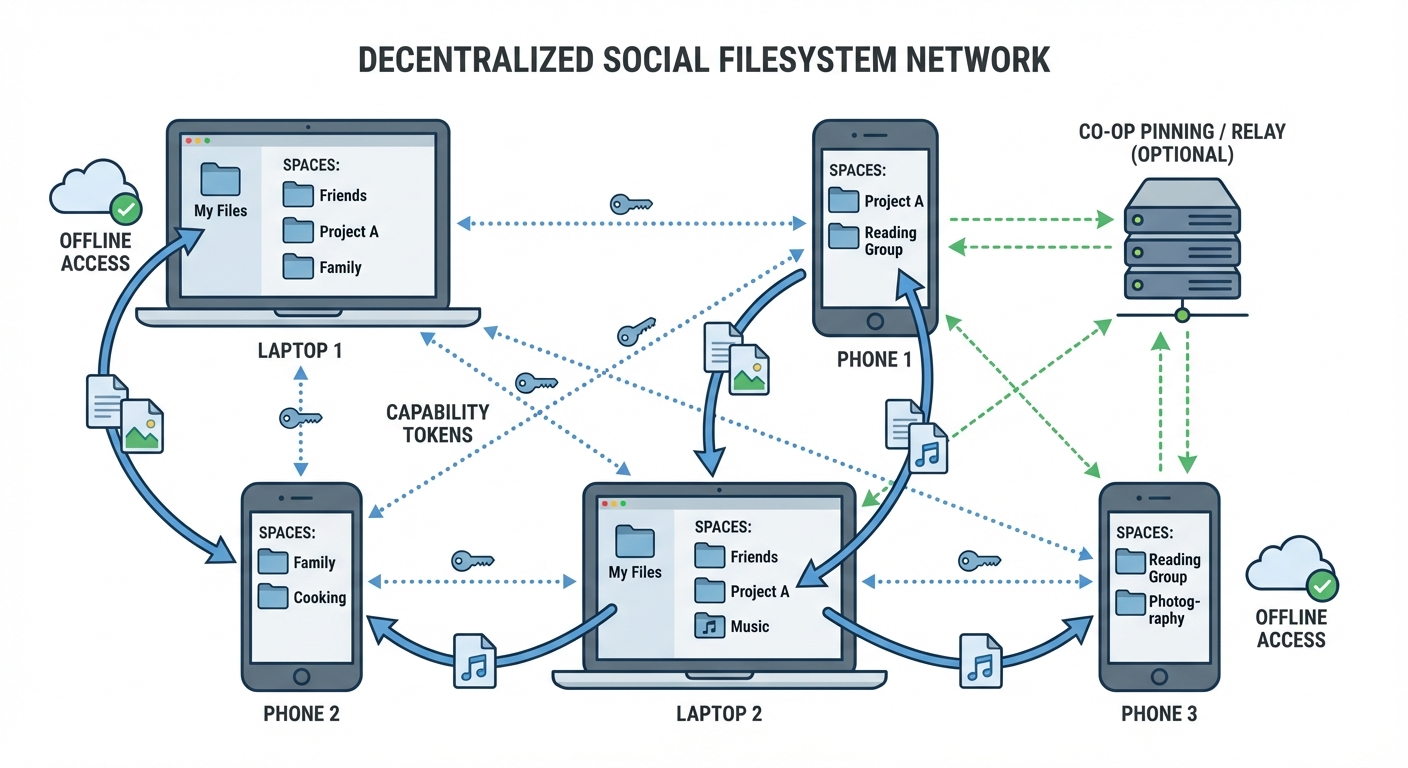
Folders as social spaces; capabilities grant access; works offline and syncs peer‑to‑peer with optional community relays.
A Social Filesystem: Summary and Practical Paths (Decentral, Offline‑Capable, Community‑Owned)
Link to the original essay: https://overreacted.io/a-social-filesystem/
The essay in a nutshell
A Social Filesystem imagines social software that works like moving files between folders you own:
- Local‑first: Your data lives on your devices and keeps working offline; network is only for syncing.
- Spaces as folders: A “space” (a folder) represents a person, group, or project. Placing something in a space shares it with exactly those members.
- Everything is a file: Posts, comments, reactions, tasks, media, even permissions are files with metadata.
- Capability links instead of accounts: Access is granted via shareable capabilities (revocable tokens/links) rather than global usernames.
- Human‑scale activity: Instead of an algorithmic feed, you see recent changes in the spaces you care about.
- Replication, not requests: Devices exchange append‑only logs; conflicts are resolved with deterministic rules (CRDT‑like).
- Portable identities and multi‑device pairing: Keys identify people and devices; you can add a device by sharing a capability.
- Open, interoperable, and extensible: No single app or company; any app that speaks the protocol can participate.
The piece is a product sketch: simple mental model (files/folders), privacy by default, offline by design, and collaboration via append‑only, capability‑secured data.
What already exists that you can use today
Below are practical, production‑proven building blocks that map closely to the vision. They’re decentralized and/or community‑operable, offline‑capable, and integrate with browsers and operating systems.
1) Virtual filesystems and OS integration
- FUSE family (user‑space filesystems)
- libFUSE (Linux): https://github.com/libfuse/libfuse
- macFUSE (macOS): https://osxfuse.github.io/
- WinFSP (Windows): https://winfsp.dev/ • Dokany (Windows): https://dokan-dev.github.io/
What this gives you: mount any data source (P2P store, CRDT log, cloud API) as a normal drive. Ideal for exposing “spaces” as folders.
- Desktop VFS layers
- GVfs (GNOME): https://wiki.gnome.org/Projects/gvfs
- KIO (KDE): https://develop.kde.org/docs/kio/
These let regular apps open files over WebDAV, SFTP, SMB, etc., without custom code.
- WebDAV (universal filesystem over HTTP): RFC 4918 — https://www.rfc-editor.org/rfc/rfc4918
- Can be mounted natively by Windows, macOS, Linux, iOS, Android clients. Great for interoperable read/write sharing.
- Rclone “mount” (bridge to many backends): https://rclone.org/
- Mounts S3, WebDAV, Dropbox, Google Drive, etc., as a local drive via FUSE/WinFSP.
- IPFS mounts (experimental but useful)
- IPFS/Kubo FUSE mount (exposes /ipfs and mutable MFS): https://docs.ipfs.tech/concepts/file-systems/#mfs
- SSHFS for simple peer mounts: https://github.com/libfuse/sshfs
These options make it realistic to surface a social space as a local folder while the backing store is P2P or cooperatively hosted.
2) Browser and PWA primitives (offline and integration)
- File System Access API + Origin Private File System (OPFS)
- MDN overview: https://developer.mozilla.org/en-US/docs/Web/API/File_System_Access_API
- OPFS guide: https://web.dev/opfs/
Lets web apps read/write user‑chosen files and store durable data offline. Works well with Service Workers.
- IndexedDB and Cache Storage for structured offline data
- Service Workers and Background Sync
- Service Workers: https://developer.mozilla.org/en-US/docs/Web/API/Service_Worker_API
- Background sync (where supported): https://web.dev/periodic-background-sync/
- Real‑time peer links
- WebRTC Data Channels: https://developer.mozilla.org/en-US/docs/Web/API/WebRTC_API
- WebTransport (QUIC): https://developer.mozilla.org/en-US/docs/Web/API/WebTransport_API
- Browser VFS libraries
- BrowserFS: https://github.com/jvilk/BrowserFS
- LightningFS (IndexedDB‑backed): https://github.com/isomorphic-git/lightning-fs
- IDBFS (Emscripten): https://emscripten.org/docs/api_reference/Filesystem-API.html
These pieces let you build a local‑first, installable web app (PWA) that works entirely offline and syncs when peers or community servers are reachable.
3) Decentralized storage, sync, and collaboration
- IPFS + libp2p (content addressing, P2P transport)
- IPFS: https://ipfs.tech/ • IPNS for mutable names: https://docs.ipfs.tech/concepts/ipns/
- OrbitDB (CRDT databases atop IPFS): https://orbitdb.org/
- Peergos (end‑to‑end encrypted social storage on IPFS, capability‑style sharing): https://peergos.org/
- WNFS (Webnative File System by Fission; capability‑based, local‑first): https://github.com/fission-codes/wnfs
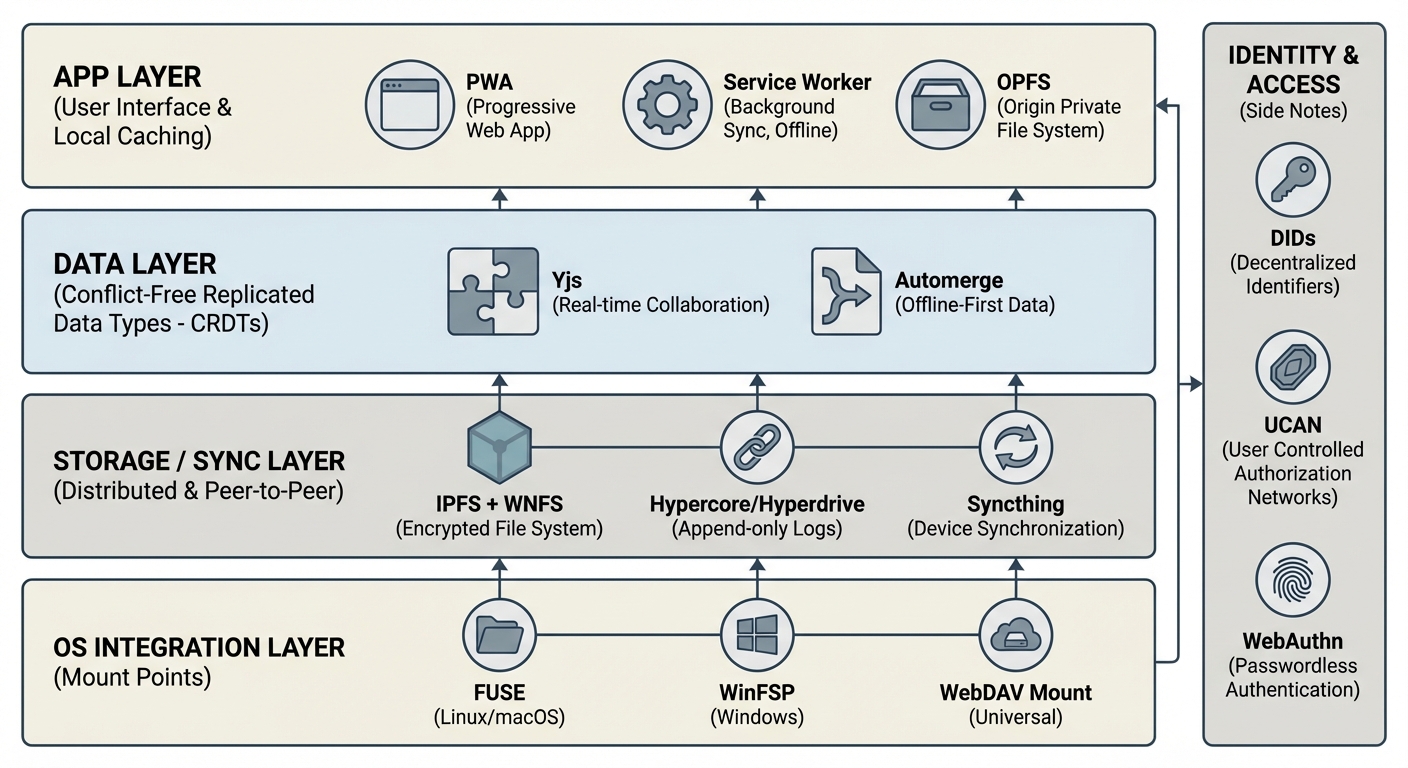
One possible stack: mountable spaces + P2P storage + CRDT collaboration + PWA front‑end.
- Hypercore Protocol stack (append‑only logs; great fit for “replication not requests”)
- Hypercore Protocol: https://hypercore-protocol.org/
- Hyperdrive (file archives), Hyperbee (key‑value), Hyperswarm (peer discovery): https://github.com/holepunchto/hyperdrive • https://github.com/hyperswarm/hyperswarm
- Secure Scuttlebutt (SSB) — fully offline‑first social replication
- Project: https://scuttlebutt.nz/ • Manyverse (mobile app): https://www.manyver.se/
- Tahoe‑LAFS — distributed, capability‑secured, encrypted storage
- Syncthing — peer‑to‑peer folder sync (LAN/offline friendly)
- Community clouds you can self‑host
- Nextcloud (WebDAV, sharing, federation): https://nextcloud.com/
- Solid pods (personal data stores, Linked Data): https://solidproject.org/
Any of these can be community‑run (co‑op, club, school, neighborhood) and work well with intermittent connectivity.
4) Local‑first data structures and collaboration engines
- CRDT libraries for conflict‑free edits
- Yjs: https://yjs.dev/ • Automerge: https://automerge.org/
- OrbitDB CRDTs, and Hypercore‑based CRDTs can back files/metadata.
- Syncable databases / frameworks
- PouchDB + CouchDB (bi‑directional sync): https://pouchdb.com/ • https://couchdb.apache.org/
- ElectricSQL (CRDT‑replicated Postgres): https://electric-sql.com/
- Replicache (commercial, local‑first sync): https://replicache.dev/
These handle “append‑only logs + merges,” exactly what the essay envisions for comments, edits, and activity streams.
5) Identity and capability‑based access
- Decentralized Identifiers (DIDs): https://www.w3.org/TR/did-core/
- UCAN (user‑controlled authorization, capability tokens): https://ucan.xyz/
- WebAuthn/passkeys for phishing‑resistant keys on devices: https://www.w3.org/TR/webauthn-2/
- Matrix cross‑signing model (multi‑device key trust): https://matrix.org/
- Nostr (public‑key identities; simple relay model): https://github.com/nostr-protocol/nostr
These can provide the “invite by capability link,” device pairing, and revocation semantics described in the essay.
Reference architectures you can build now
- IPFS + WNFS (capabilities) + PWA
- App: PWA using OPFS + Service Worker for offline cache.
- Storage: WNFS on IPFS; UCAN tokens for capabilities.
- Transport: libp2p over WebRTC for browsers; native daemons on desktop.
- OS integration: expose spaces via IPFS FUSE mount or a small WebDAV bridge.
- Outcome: end‑to‑end encrypted, revocable sharing; folders-as-spaces mental model.
- Hypercore + CRDTs + FUSE
- App: Local desktop app or Tauri/Electron; files are CRDT‑backed.
- Storage/Sync: Hyperdrive (files) + Hyperbee (metadata), Hyperswarm for discovery.
- OS integration: mount with a Hyperdrive‑to‑FUSE adapter; each "space" is a mounted archive.
- Outcome: fast LAN/offline collaboration with deterministic merges.
- Community cloud with Syncthing + Nextcloud (WebDAV)
- App: Any file app; optional PWA for activity views.
- Storage/Sync: Syncthing replicates folders peer‑to‑peer inside the community; Nextcloud adds sharing links, permissions, and WebDAV access for non‑Syncthing clients.
- OS integration: native WebDAV mounts on all platforms.
- Outcome: simple, reliable, no central corporation; great for schools and clubs.
Gaps and cautions
- Key management and recovery: Prefer passkeys + encrypted key escrow with your community admins or your own hardware tokens.
- Revocation at scale: Capabilities are easy to share; design short‑lived tokens + rotation.
- Mobile background networking is constrained: rely on opportunistic sync, LAN beacons, and push‑wake for rendezvous.
- Search and dedup across encrypted blobs is hard: consider client‑side indexing and metadata CRDTs.
- Storage incentives and quotas: IPFS without pinning has no persistence—run community pinning nodes or use pinning services.
TL;DR
You can prototype a social filesystem today by combining:
- Local‑first app (PWA with OPFS/Service Worker),
- CRDTs for conflict‑free collaboration,
- A P2P store (IPFS/Hypercore/SSB) with capability tokens (UCAN/cap‑URLs), and
- OS integration via FUSE or WebDAV so any app can open the files.
Run it as a community service (co‑op or club), and it will be decentralized, offline‑capable, and community‑owned—exactly the spirit of the original essay.