[![Contributors][contributors-shield]][contributors-url]
[![Issues][issues-shield]][issues-url]
[![Last Commit][commit-shield]][commit-url]
[![GPL-3.0 License][license-shield]][license-url]
Table of Contents
-
About The Project
-
Getting Started
- Common Issues
- Roadmap
- Contributing
- Build your own Winder
- License
- Contact
## About The Project
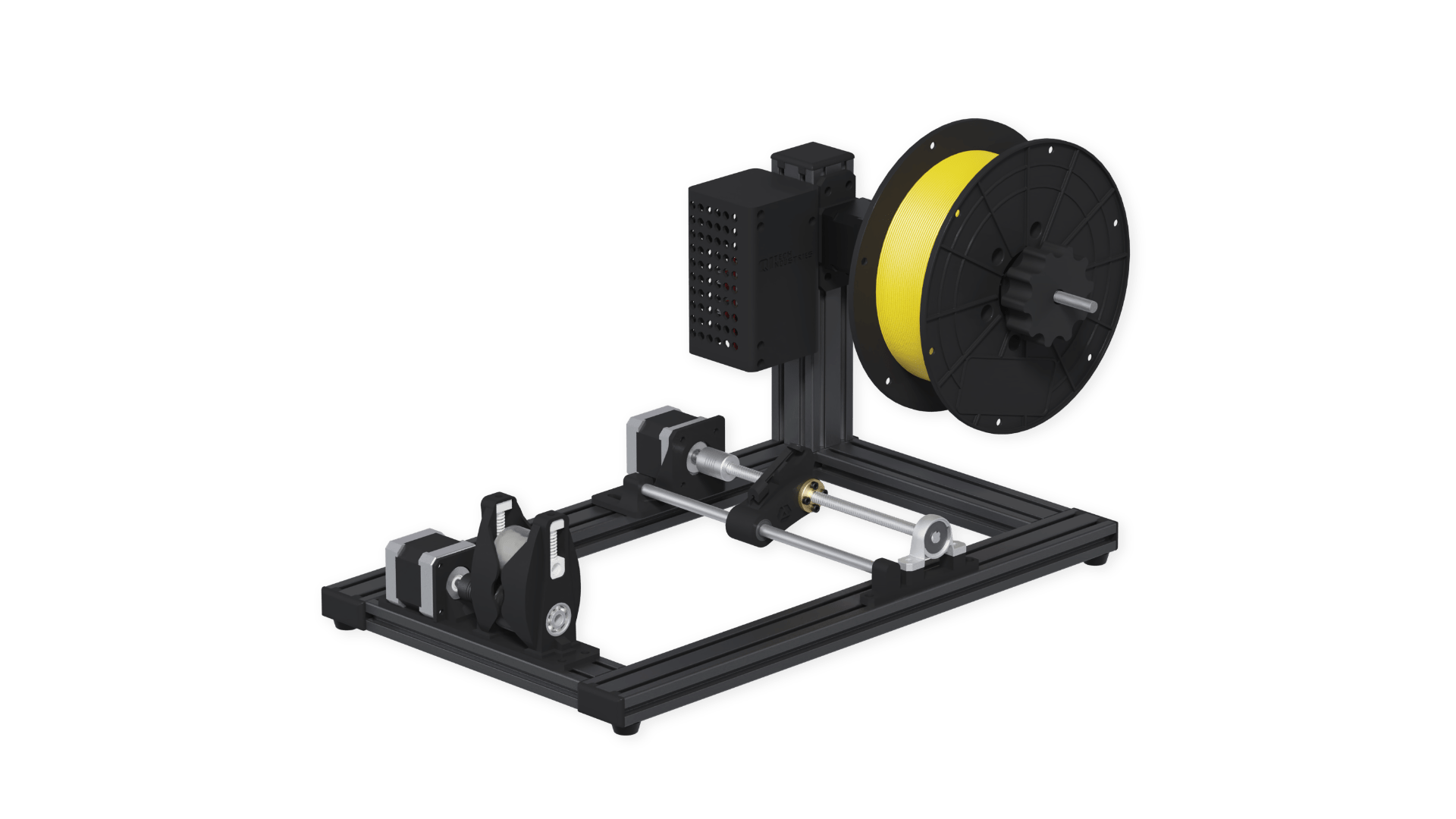
This project covers the code for the Jarvis Winder, which is a machine for winding filaments used for 3D-printing. The winder is used to wind freshly extruded filament on spools and rewind filament from one spool to another. The machine can be controlled via [Webinterface](https://github.com/QiTech-Industries/WinderWebInterface), which can be accessed with mobile devices, too. The winder can either log into an existing wifi or create its own on the fly.
(back to top)
### Built With
Currently the following libraries are in use:
| Library | Info | License |
| ----------------- | ---------------------------------------------------- | ------- |
| ArduinoJson | https://arduinojson.org/ | MIT |
| Timer | https://github.com/brunocalou/Timer | MIT |
| ESPAsyncWebServer | https://github.com/me-no-dev/ESPAsyncWebServer | GNU-2.1 |
| LittleFS | https://github.com/lorol/LittleFS.git | GPL-2.0 |
| HardwareControl | https://github.com/QiTech-Industries/HardwareControl | GPL-3.0 |
And the following main hardware components:
- Nema 17 (17HS19-2004S1)
- Nema 17 Planetary 1:5.18 (17HS19-1684S-PG5)
- TMC2130
- ESPduino (ESP32WROOM32)
- CNC Shield
(back to top)
## Getting Started
### Usage
To get a local copy flashed to the machine run these simple steps.
1. Download the latest firmware-full.bin file from the releases section.
2. Use the ESP Web flashing tool: https://espressif.github.io/esptool-js/ (recent Chrome or Edge Version)
- install correct drivers so the ESP is recognized by the PC
- select baude 115200 and click connect
- grant access to the serial port your esp is connected to
- set "flash address" to 0x0 and upload firmware-full.bin
- click the program button
- once finished press the reset button on the esp once and you should be all set ready to go 🏎️
### Installation
These steps are only required if you want to develop the library. In case you just want to use it in one of your projects refer to [Usage](#usage)
1. Install the PlatformIO extension in VsCode `platformio.platformio-ide`
2. Install the C++ extension in VsCode `ms-vscode.cpptools`
3. Install ESP32 drivers (depending on the USB-UART Chip)
- CP210 https://www.silabs.com/developers/usb-to-uart-bridge-vcp-drivers
- CH341 http://www.wch.cn/downloads/CH341SER_EXE.html
4. Clone the repo
```sh
git clone --recurse-submodules https://github.com/QiTech-Industries/Winder.git
```
5. Install the project dependencies
```sh
cd Winder && pio pkg install
```
When using Windows you need to add `pio` to your path first or use the full path `C:\Users\\.platformio\penv\Scripts\platformio.exe`
6. Upload the code and open Serial Monitor
```sh
pio run --target upload --target monitor --environment src
```
Alternatively you can use `PlatformIO->src->Upload and Monitor` in the left Sidebar
(back to top)
## Common Issues
- Imported files are not recognized (Intellisense Index build fails)
- delete .pio folder
- delete launch.json and s_cpp_properties.json in .vscode folder
- `STRG + SHIFT + P` Rebuild Intellisense Index
(back to top)
## Roadmap
This project should slowly adapt to the new Winder versions. This means apart from the WS interface there will also be a Serial interface implemented and an option for DC Motor control as well as the possibility of multiple hardware versions.
For the coming releases a new code structure is planned to make the code more modular and object oriented. Some refactored classes and a glimpse of the new code organization can be found in the [big-refactoring](https://github.com/QiTech-Industries/Winder/tree/big-refactoring) branch that will slowly get merged into main.
Apart from that all upcoming features are created and discussed as issues first.
See [open issues](https://github.com/QiTech-Industries/Winder/issues) for a full list. This is the most up to date roadmap you can get. Feel free to report new issues or fix existing ones.
(back to top)
## Contributing
Contributions are what make the open source community such an amazing place to learn, inspire, and create. Any contributions you make are **greatly appreciated**.
If you have a suggestion that would make this better, please open a issue with the tag "enhancement" to discuss whether your idea is in line with our Roadmap and we can find the best way of implementing it.
Than:
1. Fork the Project
2. Create your Feature Branch (`git checkout -b feature/AmazingFeature`)
3. Commit your Changes (`git commit -m 'Add some AmazingFeature'`)
4. Push to the Branch (`git push origin feature/AmazingFeature`)
5. Check whether your code complies with the [coding guidelines](documentation/coding_conventions.md)
6. Open a Pull Request
(back to top)
## Build your own Winder
All the documentation for the hardware of the JARVIS WINDER including CAD models and a part list can be found in this repository: https://github.com/QiTech-Industries/winder-parts
Please have in mind that we don't have the resources to provide support for custom builds. We just published our interal documentation as-is.
(back to top)
## License
Distributed under the GPL-3.0 License. See `LICENSE` for more information.
(back to top)
## Contact
QiTech Industries - [https://qitech.de/industries](https://www.qitech.de/industries) - contact@qitech.de
Project Link: [https://github.com/QiTech-Industries/Winder](https://github.com/QiTech-Industries/Winder)
(back to top)
[contributors-shield]: https://img.shields.io/github/contributors/QiTech-Industries/Winder?style=for-the-badge
[contributors-url]: https://github.com/QiTech-Industries/Winder/graphs/contributors
[commit-shield]: https://img.shields.io/github/last-commit/QiTech-Industries/Winder?style=for-the-badge
[commit-url]: https://github.com/QiTech-Industries/Winder/commits
[issues-shield]: https://img.shields.io/github/issues/QiTech-Industries/Winder?style=for-the-badge
[issues-url]: https://github.com/QiTech-Industries/Winder/issues
[license-shield]: https://img.shields.io/github/license/QiTech-Industries/Winder?style=for-the-badge
[license-url]: https://github.com/QiTech-Industries/Winder/blob/main/LICENSE